
The most important questions and answers on System Hardening and Secure Configuration
System Hardening is our profession. We regularly hear the same questions during our online seminars and from our clients. That’s why we’d like to provide brief and clear explanations of these “Frequently Asked Questions” in this FAQ. If you have any further questions, please feel free to contact us with no obligation.
_________________
What is the difference between System Hardening and Secure Configuration?
The terms “System Hardening” and “Secure Configuration” are often used interchangeably, but they have subtle differences in meaning and context.
Secure Configuration refers to a measure designed to reduce the attack surface of applications or operating systems. This involves, among other things, disabling unnecessary and insecure settings. When Secure Configuration is implemented professionally, the result is a hardened system.
System Hardening and Secure Hardening are one and the same. Both terms refer to the active reduction of a system’s attack surface through targeted measures such as disabling unnecessary services, restricting user privileges, applying security policies, or patching known vulnerabilities. The goal is to make a system more resilient to attacks by minimizing potential entry points.
_________________
How do you approach a hardening project effectively?
A hardening project should always be carried out in a structured manner across several phases. Since the entire undertaking is very complex, we’ll summarize only the most important steps here.
First, you must conduct a Hardening Audit by assessing the current hardening status of your systems. You can do this, for example, using the free AuditTAP. Next, define how you want to harden your target systems (Rapid, Layered, or Lifecycle Hardening) and according to which standards (CIS Benchmarks, Microsoft Security Baselines, and/or internal hardening configurations).
Finally, continuous monitoring is crucial for detecting and correcting configuration drifts. Tools like Enforce Administrator help you automate the implementation process, thereby creating a sort of “self-healing system.”
_________________
What tools are suitable for System Hardening?
Tools such as AuditTAP are well-suited for quick compliance scans and audits. These tools compare the current state with established benchmarks and present the results in the form of clear, concise reports.
To truly harden a system, you can use various tools. Group Policy Objects (GPOs) are a traditional but inflexible method for Windows environments. As a result, they quickly reach their limits. Ansible, Puppet, or Chef enable automated System Configuration. However, the configuration files and scripts used for this purpose must be created, tested, versioned, and continuously maintained whenever infrastructure changes occur.
Hardening solutions such as Enforce Administrator, on the other hand, offer centralized management, easy rollout of (custom) configurations, and continuous monitoring.
_________________
Are there tools available to simplify and speed up System Hardening?
Yes, there are. Specialized hardening tools such as Enforce Administrator can significantly simplify and accelerate the extensive and complex hardening process. They enable the centralized definition, deployment, and monitoring of security configurations.
As a result, you don’t need to study well-known recommendations – such as the CIS Benchmarks – in detail, nor do you need to develop your own hardening configurations or scripts. Instead, with Enforce Administrator, for example, you can obtain the desired settings virtually at the push of a button. These settings can be rolled out to client and server systems – both Windows and Linux – with minimal effort.
⏬ Download: Enforce Administrator
Product Brochure (PDF)
_________________
Does it make sense to adopt the CIS Benchmarks “blindly”?
No! It is not advisable to apply the CIS Benchmarks without making adjustments. While they offer proven recommendations for securely configuring systems, they must be adapted to your specific requirements and your IT environment.
Why? Some settings may conflict with necessary applications or processes in your organization. For example, the CIS benchmarks recommend disabling Bluetooth connections. This would prevent wireless mice and headsets from working. In day-to-day office operations, that is definitely not a good solution.
_________________
How can you create documentation for a Hardening Audit as quickly as possible?
An increasing number of IT laws, regulations, and standards – as well as cyber insurance policies – require proof of how well your IT environment has been hardened. Creating this proof manually would be extremely time-consuming. It’s better to conduct a professional Hardening Audit using AuditTAP. This process compares the current state of the systems with defined baselines – such as those from CIS, ACSC, or DISA.
The AuditTAP report can be used directly for audits, as it shows which settings were checked and where action is needed. This video shows you how to start an Hardening Audit with AuditTAP:
_________________
How can you harden a Windows 10 system according to current guidelines?
You can harden a Windows 10 system using the Microsoft Security Baselines or the CIS Benchmarks for Windows 10. These contain recommendations for a Secure Configuration, including measures such as disabling unnecessary services, restricting user rights, and enabling security features.
Windows 10 System Hardening can be very resource-intensive, especially if you want to apply the CIS Benchmarks manually across a large IT environment. It makes more sense to harden your computers using Enforce Administrator. This is significantly easier and faster.
Regardless of which method you choose, remember to phase out your Windows 10 systems as soon as possible. The operating system has actually reached “End of Lifetime” status and is now receiving only minimal support from Microsoft.
_________________
Can Windows 7 computers still be hardened?
Yes. Follow the same procedure as for “normal” System Hardening. However, it is not advisable to continue using a PC running Windows 7. Microsoft discontinued support for it years ago. As a result, Windows 7 is no longer state-of-the-art and poses a risk to information security and data protection.
_________________
Does it make sense to harden a Windows XP system?
Yes and no. In general, it’s always advisable to harden an operating system – whether it’s Windows or Linux. That’s because every OS has numerous vulnerabilities “out of the box.”
However, from today’s perspective, running a Windows XP computer no longer makes sense. Microsoft discontinued support back in 2014. This means the system has not received any security updates since then. Even if you perform a comprehensive Windows XP System Hardening, the system remains extremely vulnerable to attacks due to the lack of patches.
_________________
Is it possible to harden a Linux system quickly and easily?
Yes, Linux systems can be secured very effectively with the right tools. The CIS Benchmarks for Linux provide detailed recommendations for various distributions, such as Ubuntu, Mint Linux, Red Hat Enterprise Linux, and Rocky Linux.
That said, Linux System Hardening can be very time-consuming and complex – at least if you do everything manually. Specialized Linux hardening tools, such as Enforce Administrator, can significantly simplify the use of these benchmarks. They also ensure that the settings are consistently enforced.
_________________
Do you also need to harden Office products or Microsoft 365 applications?
Yes! Excel, Word, PowerPoint, Outlook, and others have a very large installed base worldwide and are therefore popular targets for attacks. For this reason, it is essential that you secure your Office products and Microsoft 365 applications.
So-called “Office hardening” includes, among other things, disabling VBA macros, blocking (insecure) ActiveX controls, restricting file downloads, and disabling telemetry services.
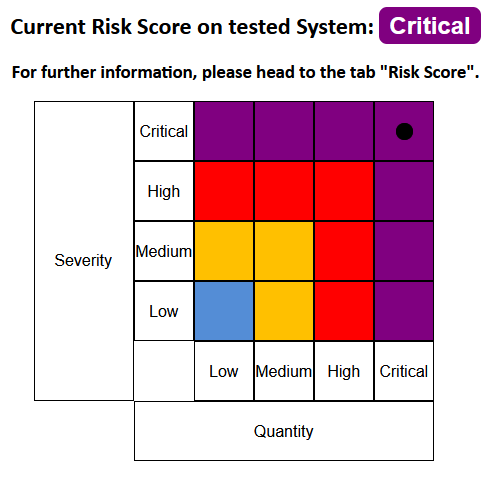
Would you like to know how well your Office programs and your operation system are hardened? Then run a quick check with AuditTAP and take a look at the risk score!
_________________
How can hybrid system landscapes be hardened?
Manually hardening hybrid environments – which encompass on-premises and cloud-based systems, as well as Windows and Linux platforms – requires an immense amount of effort. This is because a suitable configuration must be created, applied, continuously monitored, and optimized for each target system.
Therefore, you need a cross-platform System Hardening strategy that relies on automated solutions. One way to implement such a strategy is by using Enforce Administrator. This hardening tool enables centralized system management, allowing you to apply both established hardening benchmarks and custom hardening configurations.
_________________
Can systems be hardened against AI-driven attacks?
Yes! Generally, most AI-based cyberattacks rely on known patterns and methods. This means attackers exploit existing attack surfaces – albeit much faster and more efficiently than in the past. Consequently, professional System Hardening serves as a proven defense against AI attacks.
Why? Hardening a system significantly reduces the attack surface. It also disables numerous services and interfaces typically found in standard configurations. As a result, many attack vectors are rendered ineffective. Even polymorphic malware loses its threat potential.
_________________
How can System Hardening be centrally managed in large IT environments?
In IT environments comprising 100, 500, 1,000, or even more systems, professional System Hardening quickly becomes highly complex – especially if configurations are maintained manually or via disparate tools. Central management using a single tool – capable of deploying, monitoring, and adjusting Secure Configurations – is therefore the sensible approach.
Enforce Administrator is one such tool. It enables the central management and automated enforcement of hardening standards across Windows and Linux systems, regardless of whether the IT environment consists of 500 or 2,000 clients and servers. This allows even complex, hybrid system landscapes to be secured with consistent standards, managed effectively, and continuously improved.
📅 Enforce Administrator: Book a live demo
_________________
How can you verify whether Windows and Linux servers are properly hardened?
To check a server’s hardening status, its current configuration should be compared against the recommendations of a hardening standard (such as CIS Benchmarks, Microsoft Security Baselines, or DISA STIG). Use a tool like Enforce Administrator for this purpose.
This allows you to compare Windows and Linux server systems against defined hardening specifications, among other things. Consequently, deviations can be detected, documented, and corrected if necessary.
_________________
Is there a tool that automatically corrects System Hardening configurations?
Yes, modern hardening solutions can not only verify compliance with security configurations but also automatically correct any detected deviations. This is important because hardened systems can change during operation due to software updates, administrative actions, or hacker attacks. Any such change can increase the attack surface, thereby reducing the effectiveness of the System Hardening.
With Enforce Administrator, desired hardening configurations can be defined as the target state and managed centrally. The hardening tool automatically detects deviations or changes and reverts them. This prevents the accidental introduction of insecure configurations.
_________________
Which tools help achieve a NIS2-compliant configuration?
A key requirement of NIS2 is the reduction of attack surfaces through configuration management. This is highlighted, for instance, in the “NIS2 – Technical Implementation Guidance” issued by the European Union Agency for Cybersecurity (ENISA). In this document, ENISA establishes System Hardening as a mandatory task within configuration management. All network, software, and system configurations must comply with established security and operational standards. Any deviations must be identified, documented, and approved.
This means that implementing these requirements is virtually impossible without a professional hardening tool. One such solution is Enforce Administrator. This tool enables the centralized application, monitoring, customization, and documentation of standards such as CIS Benchmarks or DISA STIGs.
Download: Enforce Administrator
Product Brochure (PDF)
_________________
Secure Configuration: How can hardening configuration drift be prevented?
“Configuration drift” refers to the phenomenon where a system’s actual configuration gradually diverges from its originally defined target state. This can be caused by updates, administrative changes, software installations, or even hacker attacks. Consequently, performing System Hardening just once is insufficient; instead, you should regularly verify – or have verified – that the Secure Configuration remains intact.
An effective process involves three steps: First, define a mandatory target state. Next, regularly check the systems for deviations. If deviations are detected, they should be reported and corrected as quickly as possible.
Enforce Administrator supports this approach. It allows for the centralized management of hardening specifications while simultaneously automatically comparing the actual state with the target state. Any detected deviations are corrected immediately, thereby permanently preventing hardening configuration drift.
_________________
How can you create your own System Hardening configurations?
There are already excellent, well-established hardening standards – such as the BSI SiSyPHuS recommendations, Microsoft Security Baselines, DISA STIGs, and CIS Benchmarks. However, you should not apply these exactly as-is. Instead, you should tailor them to your specific hardening strategy and existing systems.
Creating your own System Hardening configuration can be very time-consuming – especially if you rely on Group Policy Objects (GPOs) or develop custom hardening scripts. Enforce Administrator makes the process significantly easier. This outstanding hardening tool allows you to customize existing standards or even combine them with one another.
_________________
How can 100% System Hardening be achieved?
Have you discovered – using AuditTAP, for instance – that your system is only 60, 70, or 80 percent hardened according to established standards? Does it bother you that the hardening report consequently still shows many “red” items? Are you aiming for the best possible System Hardening?
You can never achieve that goal. Why? If you configure your systems to meet every single benchmark, working with them becomes extremely inconvenient or even impossible. This is because you would likely have disabled or removed applications, services, and functions that are essential for daily use.
Therefore, 100% System Hardening should never be your objective. Nor is it required by auditors. Instead, you need the best possible compromise between practicality and security. A sensible, balanced approach is more important than slavish adherence to benchmarks.
_________________
Can different servers be hardened in different ways?
Yes. And that is a good thing, because not every server requires the same security configuration! For instance, a domain controller has different requirements than a web server or a database server. Therefore, you should differentiate your System Hardening based on system type, role, operating system, or security zone.
How is this done? With Enforce Administrator, you can centrally manage various hardening policies and apply them selectively to the specific systems or system groups for which they are intended. This prevents an “all-in-one” solution from creating unnecessary vulnerabilities and attack surfaces.
_________________
How often should the System Hardening status be checked?
Your IT landscape changes daily – due to updates, new applications, new hardware, or new requirements, for instance. Consequently, a one-time check of existing System Hardening measures is insufficient. It makes sense to regularly review, document, and adjust hardening configurations. An increasing number of IT regulations, such as NIS2, also mandate this practice.
This process of monitoring, documentation, and optimization is highly resource-intensive if performed manually. It becomes significantly easier with the right hardening tools. For example, you can use AuditTAP to perform spot checks on your hardening status and generate a hardening report.
Enforce Administrator offers continuous monitoring, automated adjustments, and simplified documentation. This hardening solution is used by banks, insurance companies, and organizations operating critical infrastructure.
_________________
What are the advantages of a specialized hardening tool over scripts?
Custom-developed scripts can be highly effective for individual hardening tasks. However, as the number of operating systems, applications, workstation and server environments, and security requirements grows, the effort involved in development, versioning, troubleshooting, reporting, and maintenance increases.
A specialized hardening application, on the other hand, consolidates all relevant hardening functions into a central interface. With a solution like Enforce Administrator, for instance, you can apply established standards (such as CIS Benchmarks and Microsoft Security Baselines) with just a few clicks, as well as create custom configurations and essential documentation.
While custom scripts can be a cost-effective solution for small IT environments, a professional hardening tool is the better choice for large, heterogeneous system landscapes comprising dozens, hundreds, or even thousands of server and client systems.
_________________
Which System Hardening tools are most effective for businesses?
There is no one-size-fits-all answer to this question. First, you need to define for yourself what you mean by “effective.” One factor could be speed. Many companies and organizations rely on what is known as Rapid Hardening.
Rapid Hardening ensures that your Windows and/or Linux systems are quickly and thoroughly hardened. To implement this process effectively and efficiently, you should automate as much as possible. That’s exactly what Enforce Administrator is designed to do.
_________________
What tools are available for automating System Hardening in corporate networks?
A corporate network typically consists of various systems with different tasks and roles. Therefore, on the one hand, it is important to customize System Hardening. On the other hand, you should not perform this task manually. This task is not feasible with standard IT resources.
A practical solution is needed! Tools like Enforce Administrator automate System Hardening in your corporate network. With just a few clicks, you can apply predefined or custom hardening configurations.
_________________
Do you have any questions? Would you like to learn more about System Hardening? Do you want to know how to implement automated System Hardening within your organization? Or would you like to see our hardening solutions in action? Then get in touch with us or schedule an appointment directly.
Images: Magnific/Freepik